Car Navigation
Eclipse AVN5495 Review: HDD Navigation, Features, Installation, and Legacy Value
Published October 8, 2026
The Eclipse AVN5495 is a 2005 double-DIN navigation receiver with a 30GB HDD, 6.5-inch touch display, DVD/CD playback and 5V preouts. This review covers its limits today.
The Eclipse AVN5495 was introduced to the U.S. market at CES 2005 as a double-DIN, hard-disk-based navigation unit that combined navigation, audio and video in one chassis. It is most interesting today as a piece of early integrated car-navigation engineering: the 30GB hard drive stores the navigation database and Music Juke library, while the unit can handle navigation and disc playback at the same time.
Verdict: The AVN5495 is a well-specified legacy navigation receiver with an unusually rich feature set for its era, especially the 30GB HDD, 5V preouts, three preamp-output pairs, route-preview/rerouting functions, and integrated DVD/CD playback. Its main weakness in 2026 is not the basic architecture but age: the documented navigation database is from June 2004, the display is only 400 × 234 × 3 dots, and the original documentation does not list modern smartphone-projection features. Buy it as a functional legacy system only when the HDD, GPS, touch panel, disc mechanism, and vehicle-specific installation are all known to be working.
What the Eclipse AVN5495 is
This is a specification-and-research review, not a hands-on test. No first-hand installation, listening test, GPS lock test, screen test, or fault diagnosis was supplied, so the performance comments below are based on Eclipse's published specifications, manuals, catalog material, and the model's documented feature set.
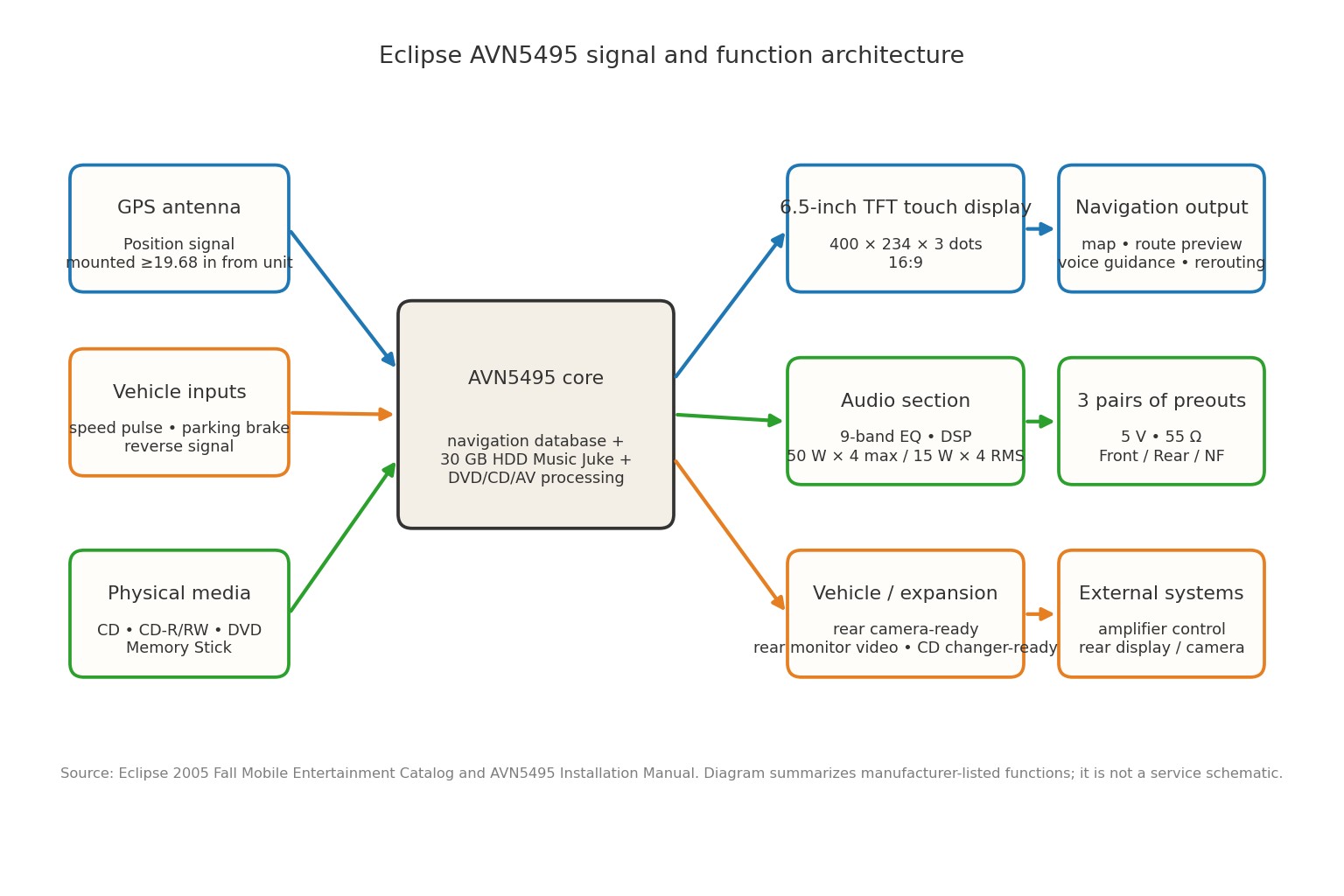
Fujitsu Ten introduced the AVN5495 to the U.S. market in January 2005, with the company describing it as its first hard-disk-based ECLIPSE navigation model introduced to overseas markets. The Fall 2005 ECLIPSE catalog documents the production feature set and identifies the navigation database as “Jun. 04.”
Key specifications
| Specification | AVN5495 |
|---|---|
| Screen | 6.5-inch wide TFT touch display, 16:9 |
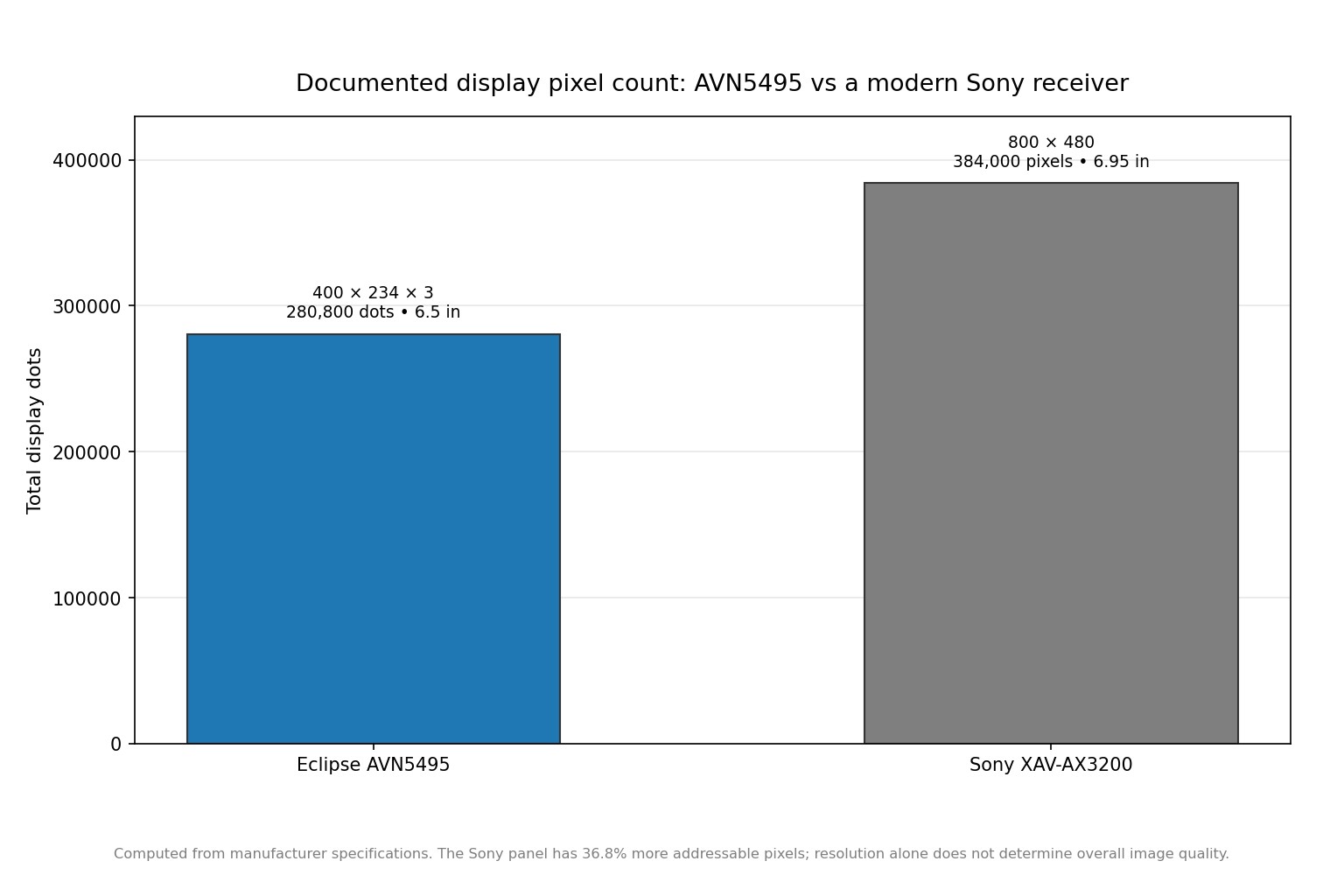
| Display resolution | 400 × 234 × 3 dots; 280,800 dots |
| Storage | 30GB hard disk drive |
| Music Juke | Up to approximately 3,000 tracks from CDs |
| Navigation database documented in catalog | Jun. 04 |
| Navigation map scale | 150 feet to 250 miles |
| Navigation guidance | 3 routes, route preview, automatic rerouting, voice announcements, split screen, zooming |
| Amplifier output | 50W × 4 maximum; 15W × 4 RMS at 1kHz, 1% THD, 4Ω |
| Preamp outputs | 3 pairs: Front, Rear, NF; 5V, 55Ω |
| Equalizer | 9-band graphic EQ, 63Hz–12kHz, ±10dB |
| Tuner | FM 87.75–107.9MHz; AM 530–1710kHz |
| CD response / THD | 20Hz–20kHz, ±1dB; 0.01% THD at 0dB, 1kHz |
| Chassis size | 180 × 100 × 165mm (7 × 4 × 6.5in) |
| Weight | Approximately 3.6kg |
| Supply | 14.4V specification; installation manual calls for 12V negative-ground vehicles |
These figures are manufacturer-published specifications. The 50W × 4 value is the maximum output figure; the CEA2006-style rated output is 15W × 4 under the stated 1kHz, 1%, 4Ω condition, which is the more useful number when thinking about continuous amplifier capability.
Navigation: the feature set that still matters
Built-in HDD navigation
The AVN5495's defining feature is the 30GB HDD. Eclipse says the drive stores the navigation database and also supports Music Juke, allowing roughly 3,000 CD tracks to be stored. Because the navigation database lives on the hard drive, the unit can navigate while also providing DVD-Video or CD playback rather than requiring the navigation source to monopolize the disc drive.
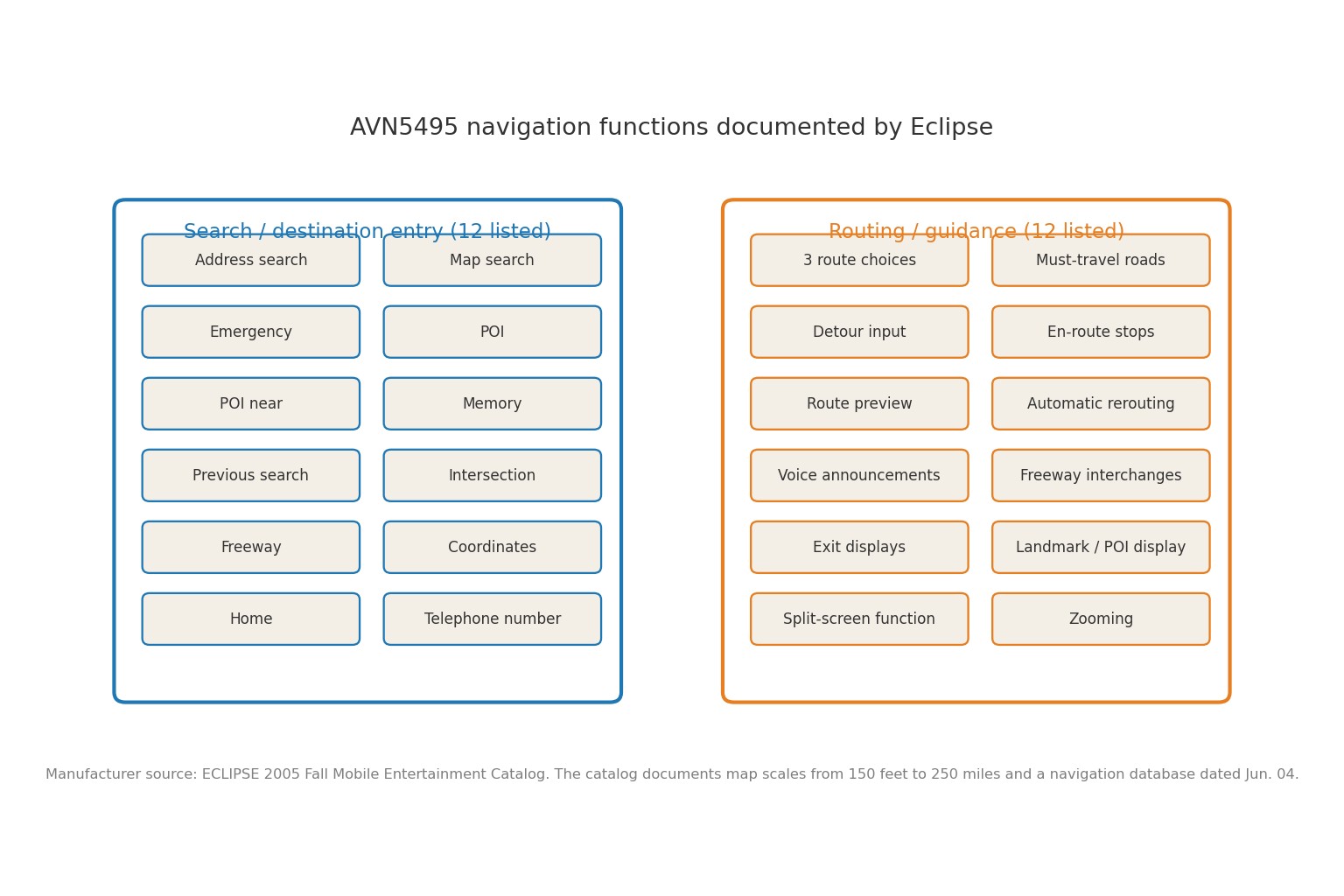
The catalog lists a surprisingly broad collection of destination-entry methods: address, map, emergency, POI, nearby POI, memory, previous search, intersection, freeway, coordinates, home, and telephone-number search. Its guidance feature list includes three route choices, must-travel roads, detour input, en-route stopping points, route preview, automatic rerouting, voice announcements, freeway interchanges, exit displays, landmark/POI display, split-screen operation, and zooming.
Map scale and database age
Eclipse's catalog specifies map scales from 150 feet to 250 miles. The same catalog lists the navigation database as June 2004. That date is important when evaluating a used unit: even when the hardware and GPS receiver are healthy, the stored road, address, and POI data can be much older than today's road network. The owner documentation says database updates could be installed from update data supplied on Memory Stick or CD-R/RW, but that historical procedure does not prove that current map updates remain available in 2026.
For a buyer today, the practical question is therefore not simply “Does the navigation work?” It is “Is the current map data acceptable for the places I drive, and can this particular unit still accept a compatible update?” Treat those as separate checks.
Display and interface
The AVN5495 uses a 6.5-inch, 16:9 TFT touch display with 280,800 dots (400 × 234 × 3). Eclipse also specifies a low-glare panel. Physical buttons remain around the screen for core functions, which can be helpful compared with relying entirely on an aging touch panel, but the display resolution is low by modern standards.
The original feature documentation does not list Bluetooth, Apple CarPlay, or Android Auto. That is not surprising for a unit introduced in 2005, but it is a major buying consideration today. The AVN5495 is designed around its own navigation database and media inputs rather than a phone-as-navigation architecture.
Audio and video features
More capable preouts than the headline power number suggests
Although the internal amplifier is rated at 15W × 4 RMS under the stated CEA2006 condition, the AVN5495 has three pairs of preamp outputs—Front, Rear, and NF—with a published 5V output and 55Ω impedance. For a system using external amplifiers, those outputs are more important than the 50W × 4 maximum headline.
At the rated 15W into 4Ω, the electrical relationship P = V²/R corresponds to about 7.75V RMS and 1.94A RMS per channel. That is a calculation from the published rating, not a measured result. Across four channels, the published RMS figure totals 60W under the specified test condition, while the maximum-output headline totals 200W; those are different rating conventions and should not be treated as equivalent continuous power.
Media and expansion
The AVN5495 supports CD, CD-R/RW, MP3, DVD-Video, DVD-R/RW and DVD+R/RW, plus Memory Stick support. Eclipse lists dual-zone operation, a rear-monitor video output, rear-view-camera readiness, support for two CD changers, Circle Surround II, a 9-band EQ, a 5-mode soundfield control system, and E-LAN data connectivity.
Music Juke is a particularly period-specific feature. The unit can digitally record CD audio to the internal HDD, automatically create playlists, and use Gracenote CDDB data for album, artist, genre and title information. The owner manual also documents checking HDD capacity and updating the title database via Memory Stick or CD-R/RW.
Used-unit buying checklist
For a used AVN5495, the condition of the storage and navigation hardware matters as much as the cosmetic condition.
- Boot the unit completely. Look for abnormal restarts, freezes, long unexplained lockups, or failure to enter the navigation or audio screens.
- Test GPS reception. Let the unit acquire a position outdoors with a clear view of the sky. A weak or unstable fix can be an antenna-placement or hardware problem, not simply old map data.
- Test the touch panel across the whole screen. Tap menus and map controls in every corner. A dead strip can make an otherwise working navigation unit frustrating to operate.
- Test the disc mechanism. Insert and eject a known-good compatible disc. The manual warns that installation angle can affect disc skipping and ejection, so a mounting problem can masquerade as a drive problem.
- Check Music Juke. Verify that the HDD library functions and that the unit can record and play stored music where permitted by the source and current hardware condition.
- Verify every amplifier output you plan to use. The three preout pairs are valuable, but a used unit may have age-related faults or damaged connectors.
- Check the camera and rear-monitor functions only with the correct accessories and wiring. Eclipse documents rear-camera and rear-monitor support, but compatibility depends on the installation and components actually fitted to the vehicle.
- Confirm the navigation data situation before paying a premium. “Navigation works” is not the same thing as “maps are current.” The catalog's documented database date is Jun. 04.
Installation and wiring
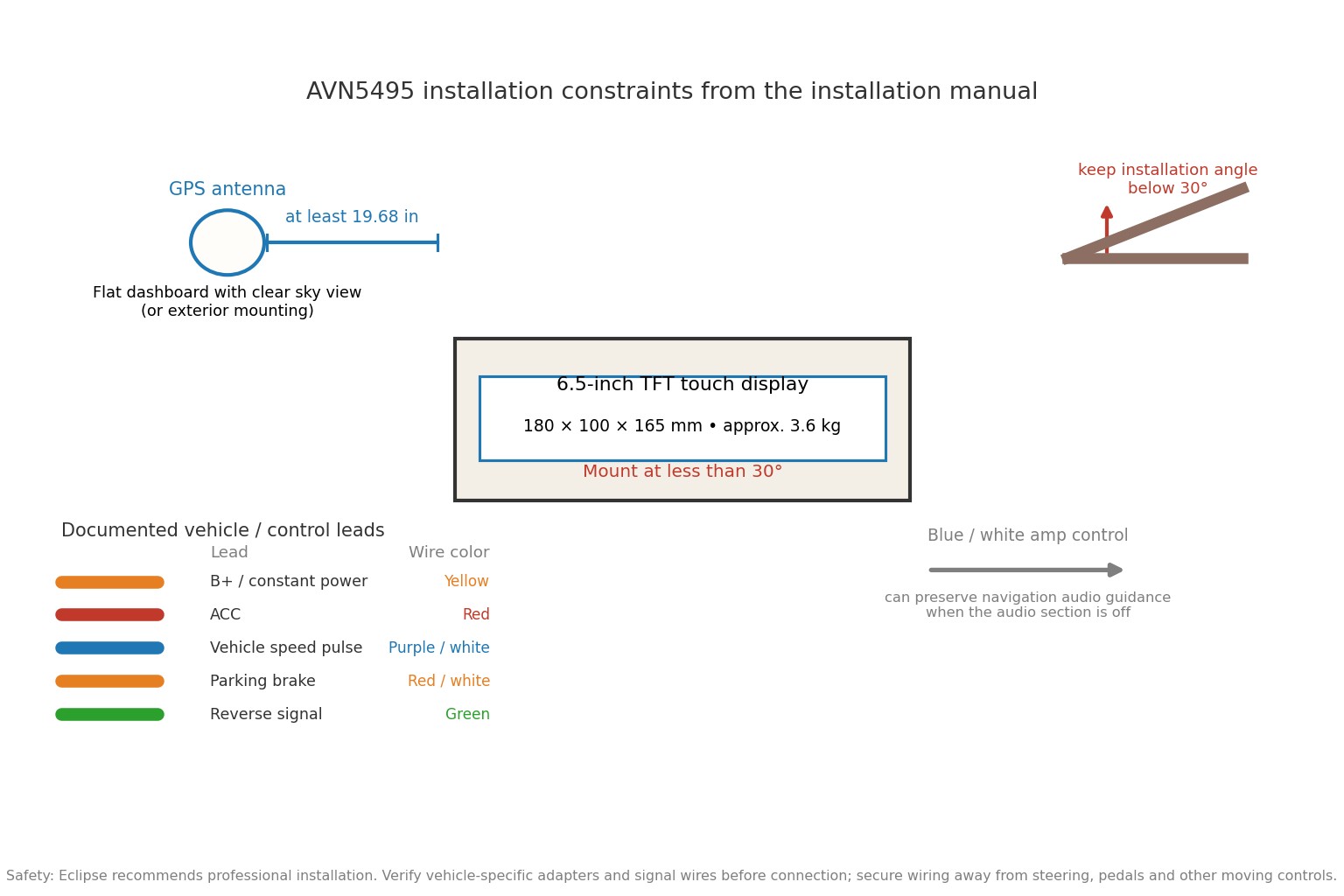
The AVN5495 is a double-DIN chassis measuring 180 × 100 × 165mm and weighing approximately 3.6kg. Eclipse's installation manual states that the unit is for 12V negative-ground vehicles. It also calls for the installer to verify the vehicle-speed-pulse, parking-brake and reverse signals before making the connections.
Power and control connections
The installation manual identifies yellow as constant B+ and red as ACC. It also identifies the vehicle-speed-pulse lead as purple/white, the parking-brake signal as red/white, and the reverse-signal cable as green. The blue/white ACC ON/OFF control output can be used with an external amplifier or other equipment, and Eclipse notes that this arrangement can preserve navigation audio guidance even when the main audio is turned off.
GPS antenna placement
For an interior installation, the manual says to choose a flat dashboard location with a clear view of the sky and to place the GPS antenna at least 19.68 inches away from the main unit. Eclipse warns that the vehicle's body shape and windshield affect accuracy and gives an exterior-installation option as well. Wiring should be secured so it cannot reach the steering wheel, shifter, brake pedal or other moving controls.
Mounting angle
The main unit must be mounted at less than 30 degrees. Eclipse specifically warns that exceeding this angle can cause disc skipping and problems ejecting DVDs, CDs, or Memory Stick media. That makes the mounting geometry important even when the navigation functions themselves appear normal.
Safety: Disconnect the vehicle power as required by the vehicle and installation procedure before wiring. Use the correct vehicle-specific harness or adapter, protect connections from short circuits, and do not substitute improvised power connections for the manufacturer's wiring. Eclipse recommends professional installation and warns that non-specified installation methods can cause accidents, injury, fire or electrical damage.
How it compares with a modern receiver
A useful modern reference point is the Sony XAV-AX3200. Sony documents a 6.95-inch display with 800 × 480 resolution, Bluetooth, Apple CarPlay and Android Auto, plus an anti-glare touch panel and quick-boot behavior. It is not a built-in navigation system like the AVN5495; instead, it uses a compatible smartphone for current map and navigation services.
| Option | What you gain | What you give up |
|---|---|---|
| Eclipse AVN5495 | Built-in HDD navigation, physical media playback, Music Juke, 5V preouts, three preout pairs, integrated legacy architecture | Old map database, low display resolution, aging HDD/disc/touch hardware, no modern smartphone-projection feature listed |
| Sony XAV-AX3200 | 6.95-inch 800 × 480 display, Bluetooth, Apple CarPlay, Android Auto, current-phone navigation workflow | No built-in HDD navigation; navigation depends on a compatible smartphone and its apps |
| Current OEM or modern navigation receiver | Best route-data freshness when the platform is still supported; easier phone integration on current systems | Exact features and installation requirements vary by vehicle and model |
| Phone + dash mount | Lowest-cost route to current map data and search, with no old HDD or optical drive to fail | Less integrated dashboard appearance and separate audio/charging/placement considerations |
The Sony figures above are included as a current technology reference, not as a claim that screen resolution alone makes it a better audio component. The important difference is architectural: AVN5495 is self-contained, while modern smartphone-integrated receivers shift map freshness and much of the navigation intelligence to the phone.
Strengths and limits
Strengths
- Integrated design: navigation, audio and video were designed to work in one double-DIN chassis.
- 30GB HDD: this supports both navigation data and a built-in Music Juke library of approximately 3,000 tracks.
- Strong preamp provision for its era: three pairs of 5V preouts make the unit more useful in an amplified system than the 15W × 4 internal rating suggests.
- Rich navigation functions: multiple search methods, three route choices, route preview, automatic rerouting, voice announcements and split-screen operation are all documented.
- Legacy media flexibility: CD/DVD/MP3/Memory Stick and rear-monitor support make sense for a period-correct installation.
Limits
- Map age is the biggest issue. The catalog documents the navigation database as Jun. 04, so current-road accuracy cannot be assumed.
- Old display technology: 280,800 dots at 6.5 inches is far below the resolution commonly found on current touch receivers.
- Aging storage and mechanisms: an HDD-based system has more age-sensitive hardware than a simple modern phone-connected receiver.
- Modern connectivity is missing from the documented feature set: the original materials do not list Bluetooth, Apple CarPlay or Android Auto.
- Installation is not generic plug-and-play: vehicle speed, parking-brake, reverse and GPS-antenna installation all matter to correct operation.
Who should buy the AVN5495 today?
The AVN5495 makes the most sense for a period-correct vehicle, a collector-style restoration, or a buyer who specifically wants an original-style double-DIN HDD navigation system and understands its limitations. It can also make sense when an existing installation already has the required brackets, harnesses and accessories and the unit is known to be healthy.
It is a poor choice when the priority is current maps, wireless phone integration, streaming-first use, high-resolution screen presentation, or long-term parts and software support. In those situations, a modern receiver with smartphone navigation is the more practical architecture.
Final verdict
The Eclipse AVN5495 was technically ambitious for 2005. Its 30GB HDD let navigation and entertainment coexist, its navigation feature list was extensive, and its three pairs of 5V preouts gave it serious system-integration potential for the era.
Today, the same features that make it interesting also define its limits. The navigation database is old, the display resolution is modest, and the mechanical HDD/DVD-centered design is now a legacy platform. I would recommend it only when the goal is a working period-correct system or a specific restoration—not as the most sensible way to get modern navigation.
Sources and further reading
- DENSO TEN / FUJITSU TEN press release: AVN5495 introduction at CES 2005
- ECLIPSE 2005 Fall Mobile Entertainment Catalog
- ECLIPSE/Fujitsu Ten AVN5495 manuals archive
- AVN5495 installation manual reproduction for page-referenced wiring and mounting details
- Sony XAV-AX3200 specifications
Last reviewed: October 2026
Eclipse AVN5495 FAQ
Is the Eclipse AVN5495 still useful today?
It can still be useful as a working legacy double-DIN system, especially for a period-correct vehicle or restoration. It is much less attractive when current maps, modern smartphone integration, and long-term support are priorities.
Does the AVN5495 have built-in navigation?
Yes. Its navigation data is stored on a 30GB internal hard disk, so navigation does not depend on using the optical drive for the map database. The catalog lists multiple search methods and route-guidance functions.
How old is the AVN5495 navigation data?
Eclipse's Fall 2005 catalog identifies the navigation database as Jun. 04. The owner manual describes a historical update procedure, but that documentation does not establish that compatible current map updates are still available.
What is the AVN5495 screen resolution?
The unit uses a 6.5-inch 16:9 TFT touch display with 400 × 234 × 3 dots, or 280,800 dots. That resolution is low by modern receiver standards, so buyers should expect a visibly older display presentation.
How much amplifier power does the AVN5495 provide?
Eclipse rates it at 50W × 4 maximum and 15W × 4 RMS at 1kHz, 1% THD and 4Ω. The unit also provides three pairs of 5V preamp outputs for external amplification.
Does the AVN5495 support Bluetooth, CarPlay or Android Auto?
Those features are not listed in the original Eclipse feature documentation I found. The system is built around its own HDD navigation, physical media, and legacy expansion architecture rather than modern smartphone projection.
What should I check before buying a used AVN5495?
Test GPS reception, the touch panel, HDD and Music Juke functions, CD/DVD loading and ejecting, and every preamp output you intend to use. Also confirm the map-data situation and inspect the installation wiring, because the unit depends on vehicle-speed, parking-brake and reverse signals.